
Blog
CRM for Online Course Businesses: Do You Really Need One?
CRM for an online course business: what it adds beyond a spreadsheet, the data worth tracking, segmentation for campaigns, and when you can skip one.
Automation and techWhen your online course business is small, a spreadsheet feels like enough. A few names, a few emails, and you remember the rest. But as members grow, the cracks show: you forget who bought what, who is stuck, who has gone quiet. That is the moment people ask whether they need a CRM. The honest answer for most growing course businesses is yes, but not the heavy enterprise kind. This article explains what a CRM for an online course business actually adds, what to track, and when you can still get away without one.
We will cover what a CRM gives you beyond a spreadsheet, the key data points worth tracking per member, how segmentation powers better campaigns, when a dedicated CRM is overkill, and how an integrated member CRM works.
The right answer is rarely the biggest tool. It is the one that fits how you actually work and grows with you, so the structure helps rather than slows you down.
The short answer: you need five data points per member and three or four tag categories, not a sales pipeline. If those fill themselves from purchases and course activity, you have a working CRM. If you would have to type them in, you will not keep it up.
Why a CRM matters for an online course business
A CRM, short for customer relationship management, is simply a system for keeping track of your contacts and your relationship with each of them. A spreadsheet can store names, but it cannot react. A CRM connects a person to their behavior: what they bought, where they are in your courses, when you last heard from them. That turns a static list into a living picture.
The biggest gain is that nothing slips through. With a CRM for an online course business, you can see at a glance who is a prospect, who is an active student and who has lapsed, and act accordingly. Instead of treating everyone the same, you meet each person where they actually are. For a business built on relationships and trust, that is a serious advantage.
There is also continuity to consider. When you remember the details of someone's last interaction, they feel seen and taken seriously. In a business built on personal trust, that feeling often decides whether a member buys again or quietly drifts to someone else. A CRM holds those details for you, even when your mind is elsewhere.
Members who are stuck are the clearest case: the CRM shows you who started a course and stopped, which is where most of your saveable churn sits, as covered in reducing community churn.
A CRM is also the foundation for everything automated. Targeted emails, re-engagement flows and upsells all depend on knowing who someone is and what they have done. Without that structured data, your marketing is guesswork. With it, every message can be relevant, which lifts both sales and retention.
Key data points to track per member
A CRM is only as useful as the data in it, but more is not always better. For a course business, a focused set of data points does most of the work. These are the ones worth tracking for every member:
| Data point | The question it answers | Where it comes from |
|---|---|---|
| Status | prospect, customer or lapsed | the purchase and the cancellation |
| Purchases | what to offer next | checkout |
| Course progress | who is stuck | lesson completions |
| Engagement | who is drifting | last login or activity |
| Source and interest | what to talk about | signup form or clicked link |
The third column decides whether this works. Every one of these can arrive on its own. A field that needs you to type it in is a field that will be empty in three weeks.
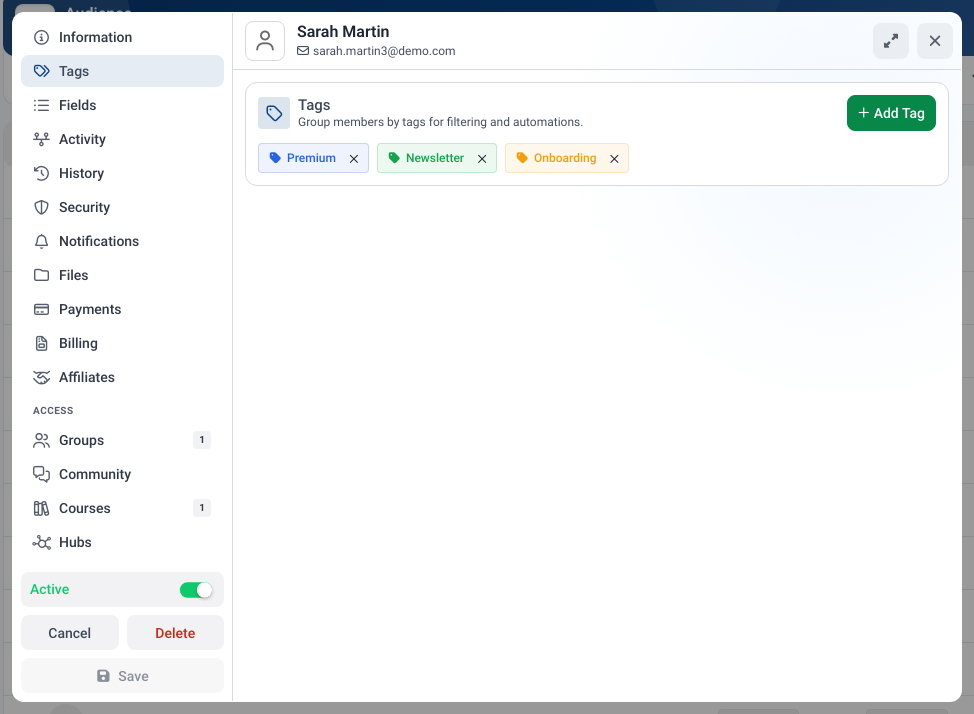
One profile per member, with tags, payments and course access in the same place, replaces the spreadsheet and the notes beside it.
The goal is not to collect everything, but to collect what you will act on. Each data point should answer a question you actually use to decide what message someone gets next. When your CRM fills with this automatically, you build a precise picture of every member without manual data entry.
Resist the urge to over-collect. A CRM stuffed with fields you never look at becomes a chore to maintain and a fog to read. Track the few signals you genuinely act on, and the picture stays sharp and useful rather than cluttered.
Segmentation for targeted campaigns
The real payoff of a CRM is segmentation: dividing your members into meaningful groups so you can speak to each one differently. Instead of blasting the same email to everyone, you reach exactly the people for whom a message is relevant, which dramatically lifts results.
For a course business, useful segments are easy to imagine. Prospects who have not bought get nurturing and an offer. Students who finished a course get the next one. Members who have gone quiet get a re-engagement message. Buyers of a specific course get a related upsell. Each segment receives something that fits, so it lands as helpful rather than as noise.
The most powerful segments combine criteria. Someone tagged as a prospect who is also interested in a particular topic is the perfect audience for that specific offer. These intersections are where generic marketing becomes precise, and they are only possible when your data is structured in a CRM. How email connects to this is shown on the email marketing page.
Segments worth having
| Segment | Built from | What they get |
|---|---|---|
| Prospects who have not bought | status plus interest | nurturing, then one offer |
| Finished a course | progress at 100 percent | the next course |
| Started but stalled | progress plus no recent activity | a nudge back to one lesson |
| Quiet for 30 days | last activity | a re-engagement message |
| Bought course A | purchases | the related upsell |
Notice that every segment here is built from the five data points above and nothing else. Which emails these segments should receive is covered in email automation for membership sites and in email marketing for an online course.
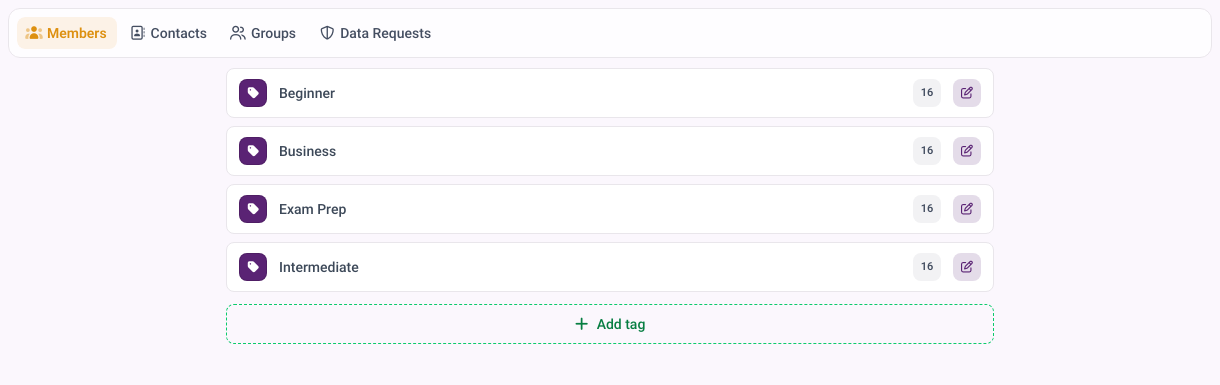
The count next to each tag tells you immediately whether a segment is big enough to deserve its own message.
Watch how each segment responds, too. If one group reacts strongly to a certain message, that is a lesson for the next campaign. Over time your CRM does not just store data, it teaches you what your members actually want.
When you can get away without a dedicated CRM
Honesty matters here, because not everyone needs a separate CRM tool. If you are just starting, with a handful of members and a single offer, a spreadsheet really can be enough for a while. The overhead of a complex CRM would slow you down more than it helps. Start simple and add structure when you feel the pain.
The signs you have outgrown the spreadsheet are clear: you forget to follow up, you cannot tell who bought what, you send everyone the same email because segmenting by hand is too much work. When those frustrations appear, a CRM stops being optional. The key is that you rarely need a heavy standalone tool; you need member data that is structured and usable.
One more sign you have outgrown the spreadsheet: you find yourself building ever more complicated formulas just to answer simple questions about your members. When the workaround becomes harder than the proper tool, it is time to switch.
Spreadsheet, standalone or built in
| Option | Who keeps it current | Best when |
|---|---|---|
| Spreadsheet | you, by hand | under roughly 50 members and one offer |
| Standalone CRM | an integration you maintain | you sell outside the platform too |
| CRM inside the platform | the platform itself | your courses and payments already live there |
The middle row is the one people underestimate. A standalone CRM is not just a subscription, it is a sync you now own and have to fix when it breaks. What that plumbing looks like is in automating your course business with Zapier.
That is the real distinction. The question is not spreadsheet versus enterprise CRM, but whether your member data is connected to action. The best answer for most course businesses is a CRM built into the platform they already use, so the data fills itself and stays useful without extra work.
CRM features inside memberarea.io
A CRM for an online course business works best when it is not a separate island. On memberarea.io the CRM is connected directly to your courses, members and payments. Purchases, sign-ups and activity flow automatically into each contact profile, so your CRM fills itself instead of being maintained by hand.
Because everything lives together, you can tag and segment members and reach them with the right emails or automations straight from the CRM. You see the full picture for each contact and make decisions on real data instead of guesses. Learn more on the CRM page, see how flows connect on the automations page, and view the plans on the pricing page.
Keep only what you use
A CRM holds personal data, which brings the GDPR into play for any member in the EU. Two principles from Article 5 apply directly: personal data must be adequate, relevant and limited to what is necessary in relation to the purposes for which they are processed, and kept in a form which permits identification for no longer than is necessary for those purposes (Art. 5 GDPR). In practice: record what you use to decide the next message, not everything you happen to know, and delete contacts who have had nothing to do with you for years. That is also why the five data points above are a better starting point than a form with thirty fields.
A practical benefit of an integrated CRM is that your data is always current and complete. There is nothing to sync between systems and no imports to maintain. Every action a member takes updates their profile automatically, so you can trust the numbers at any moment.
Use memberarea.io's built-in member CRM and turn scattered data into real closeness with your members. Try memberarea.io for free and get to know your members properly.
Frequently asked questions
Do I need a CRM as a small course creator? Not immediately. With a few members a spreadsheet works. But the earlier you start with structured data, the less you have to untangle later, so build the habit sooner rather than later.
Is a CRM too complex for a course business? A big enterprise CRM, yes. A lean, integrated one, no. The key is that it fits your reality and that the data largely maintains itself.
What is the difference between a CRM and an email list? An email list stores addresses, a CRM stores relationships. It knows who someone is, what they have done and what stage they are in, and makes that usable for targeted messaging.
Where do I start? Decide on a few clear tags, such as status and interest, and apply them consistently, ideally automatically. Even this simple structure makes your communication noticeably more targeted.
Conclusion
A CRM for an online course business is what keeps you close to your members as you grow. It adds behavior and context a spreadsheet cannot, lets you track the data that matters, and powers segmented campaigns that actually land. You can start on a spreadsheet, but the moment things slip through the cracks, an integrated CRM is the fix.
Where the members come from before any of this matters is covered in getting your first 100 members.
Remember that your relationships are the real asset of a course business, and a CRM is what keeps them visible as you scale.
Begin with a few clear data points and a couple of segments, then expand. Try memberarea.io for free and use a CRM that is connected directly to your courses and members.



Ready to build your membership?
Try it free for 14 days. No credit card, no setup fees. Launch in minutes.
No credit card required · Cancel anytime