
Blog
Best Skool Alternative in 2026: Native Payments and Courses
Looking for a Skool alternative with courses, email and native payments built in? Compare the best all-in-one options for 2026.
Tool comparisonsSkool has become a favorite for creators who want a simple, lively community without much setup. It is fast, focused and easy to enjoy. The limits show up when your business needs more than discussion: structured courses, native payments, real email marketing and automation. When you reach that point, you start looking for a Skool alternative that includes the pieces Skool keeps deliberately light.
This guide compares the strongest options in 2026, with a focus on platforms that bundle courses, email and native payments rather than treating them as afterthoughts. Feature sets and prices change often, so treat every point here as a starting point and confirm the current details on each provider's own site before you decide.
The short answer
MemberArea is the strongest Skool alternative when you need real courses, email and native payments: everything in one bill, EU hosting, no platform fee. Circle fits a more polished community, Mighty Networks adds more structure, and Kajabi brings the full marketing suite.
- Skool Hobby is $9 a month but takes 10% plus 30 cents of every sale, the highest cut in this comparison.
- Past roughly $1,000 in monthly revenue, that makes Skool the most expensive option here.
- Each Skool plan covers a single community, and email marketing is not built in.
- Every price was checked on 6 September 2026 and links to its source.
In this guide: price table · what Skool offers · the alternatives · real cost · FAQ
The providers at a glance
| Provider | Entry plan per month | Mid plan | Fee per sale | Worth knowing |
|---|---|---|---|---|
| memberarea.io | €39 (Starter) | €119 (Professional, 2,500 members) | none | Courses, community, email, events, affiliate, website |
| Circle | $89 (Professional, billed annually) | $199 (Business, billed annually) | 2% or 1% | Community first, courses secondary |
| Mighty Networks | $35 (Explore) or $95 (Launch) | $215 (Scale) | Explore 5%, Launch 2%, Scale 1% | Branded app only on Mighty Pro |
| Skool | $9 (Hobby) | $99 (Pro) | Hobby 10% + $0.30, Pro 2.9% + $0.30 | Deliberately minimal, little customisation |
Prices checked on 6 September 2026, as published by each provider and excluding payment processor fees (Stripe and PayPal add roughly 2.9 percent). Mighty Networks is listed at its monthly billing prices; billed annually that is $79 for Launch and $179 for Scale, while for Explore the provider publishes only the annual price of $350. Circle publishes only its monthly rate at annual billing. Providers change their plans often, so always confirm the current figures on the linked page.
What Skool offers and where a Skool alternative helps
Skool does community very well. The interface is clean, members find their way around quickly, and simple gamification with points and levels keeps people coming back. A basic course area sits alongside the community, which is enough for many creators at the start. For a fast, engaging community with minimal fuss, Skool is genuinely good.
The gaps appear once you want to run a fuller business in the same place. The course experience is intentionally simple, native payment flexibility is limited compared with dedicated tools, and email marketing, automations and deeper API access are light. Many creators end up adding separate tools to cover these, which means more subscriptions and more moving parts. A good Skool alternative closes those gaps without losing the easy community feel.
It also helps to think about where you want to be in a year. A tool that fits a small community today can feel tight once you add paid courses, multiple products and automated onboarding. Choosing with that growth in mind saves you a painful migration later, because moving an active community to a new home always costs time and loses a few members along the way.
Before comparing options, write down the two or three things Skool does not do well enough for you today. That short list is the real test for every Skool alternative below, and it keeps you focused on what actually matters for your business. Wherever you land, the work of building an online community stays yours.
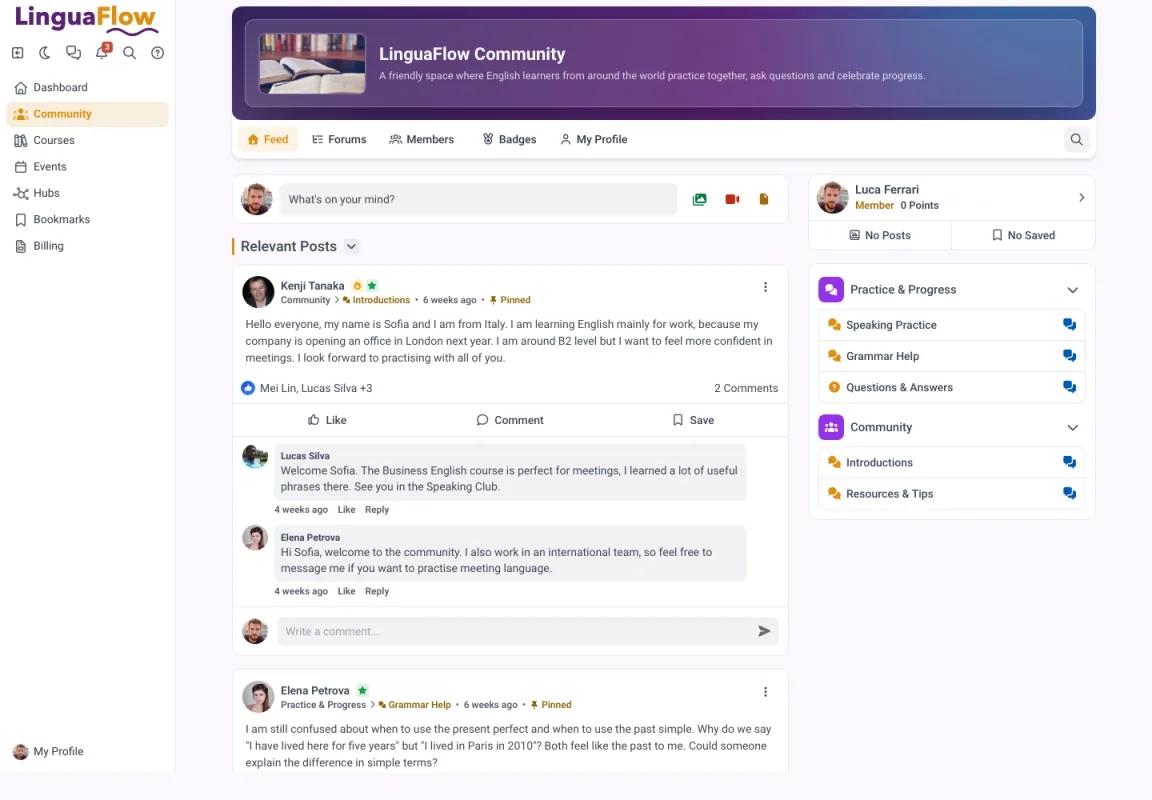
The community feed with pinned posts and forums by topic.
Alternative 1: MemberArea, the all-in-one option
What it does well
MemberArea brings community, courses, email marketing, automations and Stripe payments together in a single login. There are no per-member fees, the platform takes no cut of your sales, and hosting is in the EU with GDPR ready data handling. For a creator outgrowing Skool because courses and payments feel too basic, this is the most direct upgrade path.
The advantage is more than features. Having members, courses and community in one place gives you a single view of your business, which makes decisions easier and saves the time you would spend wiring separate tools together. Built in email and automations let you run onboarding and launches without another subscription. Check current plans on the pricing page.

The course side is a full builder with categories and progress, not a folder of videos next to the feed.
Where it falls short
It will not fit everyone. If you only want a simple community and never plan to sell structured courses, a lighter tool may feel less heavy. For creators who want one platform to run the whole business, an all-in-one is usually the more economical path once you add up the tools it replaces.
The migration is worth a thought too, since moving an active community is the part most people dread. Look for clear guidance on importing members, content and any active subscriptions, so the switch from Skool keeps your momentum rather than stalling it. A smooth and well planned handover protects the relationships you have already built and the trust that quietly holds your community together.
Best for
Creators who outgrew the 10 percent fee on Skool's Hobby plan and now sell structured courses alongside the community.
Alternative 2: Circle, better community features
What it does well
Circle is a polished, community first platform that many creators rate highly for discussions, spaces and events. Compared with Skool it often feels more developed on the community side, with more room to shape the experience and present it under your own brand. If your priority is a richer community than Skool offers, Circle is a natural option to weigh.
Where it falls short
The trade-offs are familiar. Courses are lighter than on dedicated course platforms, some email features can sit on higher tiers, and certain plans may carry a transaction fee on sales. A complete stack can add up, so look closely at which features are included in which plan and confirm the current pricing directly with the provider before deciding.
A fair question is whether you need courses and selling inside the same tool as your community. If you do, Circle may leave you adding extra software, which narrows the gap with a full all-in-one. If a strong community really is the heart of your offer, that focus can be exactly what you want.
Best for
Community led memberships with a budget for polish. The reverse view is in our guide to the best Circle alternatives.
Alternative 3: Mighty Networks, more structured
What it does well
Mighty Networks combines community with courses and tends to offer more structure than Skool. It is built around connected communities, groups and content, and depending on the plan it provides a broad set of features for growing an active membership. For creators who want both interaction and a proper learning experience, it is worth comparing against Skool.
As always, the detail is in the plan. Look at which course and payment features are included at the tier you would actually buy, and confirm pricing directly with the provider. For audiences in the DACH region it is also worth checking language support, local payment methods and the data handling terms before you commit.
Best for
Memberships that need courses and a mobile app next to the conversation. See also the Mighty Networks alternatives.
Alternative 4: Kajabi, premium and feature rich
What it does well
Kajabi is a mature all-in-one with a deep feature set covering courses, marketing, email and payments. If you want a broad platform with a large ecosystem and budget is not your main constraint, it is worth weighing as a Skool alternative that brings serious marketing tools alongside courses.
Where it falls short
The common feedback is that Kajabi sits at the premium end on price, and some features you expect can live on higher tiers. Community features exist but are not always the main reason people choose it. Map your real needs against the current plans, and confirm the latest pricing on the provider's site so the total cost holds no surprises.
If you came from Skool for the easy community feel, be honest about whether Kajabi delivers that side strongly enough for you. It shines on courses and marketing, so it tends to suit creators whose business leans more on selling and content than on day to day member interaction.
Best for
Marketing heavy businesses with the budget to match. Seven platforms run against each other in the best Kajabi alternatives.
How to compare the real cost
Headline prices rarely tell the whole story. The number that matters is your total monthly cost once you include member limits, paid add-ons and any fee taken from your sales. A platform that looks cheap can become expensive after you add the course tool, the email tool and the tier you need to remove a cap or drop a transaction fee.
Build a small spreadsheet with your expected member count and the features you genuinely need, then enter the current price for each candidate. Because prices change, take the figures straight from each provider rather than from a comparison post. An all-in-one with no per-member fees and a flat rate is often the cheaper route once everything is counted. Our overview of membership site software does that calculation at 100, 1,000 and 2,500 members.
The best Skool alternative is the one that covers your whole offer in a single bill, without charging you per member or per sale.
Verdict for creators who need more than Skool
If a simple, lively community is all you need, Skool is hard to beat and you may not need to move. The moment courses, native payments, email and automation become central, a Skool alternative that includes them pays off. MemberArea is the most complete all-in-one for that, Circle is excellent if richer community is the goal, Mighty Networks adds structure, and Kajabi suits premium budgets with heavy marketing needs.
Shortlist two or three options, then test them with your real content during a free trial. Start free on MemberArea and see whether one platform for community, courses and payments fits the way you work.
Frequently asked questions
What is the best Skool alternative? It depends on your needs. For a true all-in-one with courses and native payments, MemberArea is a strong choice. Circle suits richer community, while Mighty Networks adds more structure.
Does Skool include courses and native payments? Skool offers a basic course area and a simple payment model, but both are lighter than on dedicated platforms. If you need depth here, an alternative is worth considering.
Can I move my community from Skool? Yes, a move is possible. Plan the migration of your members, content and any courses calmly and use the new provider's migration help where it is offered.
Final thoughts
There is no single best platform, only the best one for your situation. Get clear on what made you look for a Skool alternative, score the options against your real needs, and confirm prices and data handling directly with each provider. Then test your shortlist with real content before you commit. Start free on MemberArea and find out whether it is the right fit for your community.



Ready to build your membership?
Try it free for 14 days. No credit card, no setup fees. Launch in minutes.
No credit card required · Cancel anytime