
Blog
Best Kajabi Alternative in 2026: 7 Options Compared
Compare 7 Kajabi alternatives with prices checked September 2026: what each costs per year, platform fees per sale, and who should switch (or stay).
Tool comparisonsKajabi is a capable all-in-one platform, but its entry plan starts at $179 a month and the bill climbs as your audience grows. If you are searching for a Kajabi alternative, you are usually after the same core capabilities, courses, community, email and payments, at a cost you can predict twelve months out. This guide compares the strongest options in 2026, with the actual numbers, so you can pick the one that fits your business rather than the one with the loudest marketing.
We keep the comparison honest. Feature sets and prices change often, so every figure here carries the date it was checked and a link to the source. Treat this as a shortlist tool: narrow the field to two or three candidates, then test them with your real content before you commit.
The short answer
For most creators, the most direct Kajabi alternative in 2026 is memberarea.io: the same all-in-one scope of courses, community, email and payments from €39 a month, no platform fee on any sale, and EU hosting. Pick Teachable or Thinkific for course-only delivery, Circle or Mighty Networks when community is the product, and Skool to validate a first paid community on a small budget.
- Kajabi Basic is $179 a month, which is $2,148 a year paid monthly, and caps you at 5 products.
- MemberArea Starter is €468 a year with no fee per sale. Teachable Starter is $468 a year but takes 7.5% of every sale.
- Platform fees decide the ranking at scale: 7.5% on $100,000 of yearly revenue is $7,500, more than any subscription in this comparison.
- Every price in this guide was checked on 6 September 2026 and links to its source.
In this guide: price table · yearly costs · the 7 alternatives · who should stay · how to migrate · FAQ
The providers at a glance
| Provider | Entry plan per month | Mid plan | Platform fee per sale | Worth knowing |
|---|---|---|---|---|
| memberarea.io | €39 (Starter, 100 members) | €119 (Professional, 2,500 members) | none | Courses, community, email, events, affiliate, website |
| Teachable | $39 (Starter) | $89 (Builder, 10 products) | Starter 7.5%, 0% from Builder up with teachable:pay | Starter limited to 1 admin and 5 published products |
| Podia | $49 (Mover) | $99 (Shaker) | Mover 5%, 0% above | Email contacts capped per plan |
| Skool | $9 (Hobby) | $99 (Pro) | Hobby 10%, Pro 2.9%, each plus $0.30 | One community per plan, no course depth |
| Circle | $89 (Professional, billed yearly) | $199 (Business, billed yearly) | 2% or 1% | Community first, courses secondary |
| Mighty Networks | $95 (Launch) | $215 (Scale) | 2% or 1% | Host seats limited per plan |
| Kajabi | $179 (Basic) | $249 (Growth, 25,000 contacts) | 2% with an external gateway on Basic | Basic capped at 5 products |
Prices checked on 6 September 2026, as published by each provider and excluding payment processor fees (Stripe and PayPal add roughly 2.9 percent plus a fixed amount per transaction). Providers change their plans often, so always confirm the current figures on the linked page. Thinkific is covered below without prices: its pricing page is geolocated and shows different figures depending on the country you open it from.
What Kajabi costs over a year
Monthly figures hide the size of the decision. Paid month to month, Kajabi Basic is $2,148 a year and Growth is $2,988. Teachable Starter is $468, Podia Mover is $588 and MemberArea Starter is €468. Circle publishes no month to month rate, so its Professional plan works out at $1,068 a year on annual billing. Annual billing lowers most of these by roughly twenty percent, which is worth taking if you are confident about the platform, and worth skipping while you are still testing.
The plan is only half the bill
The second half is what the platform takes from each sale, and this is where the ranking changes. A plan that looks cheap can carry a percentage that quietly outgrows the subscription. Teachable Starter takes 7.5 percent, Podia Mover takes 5 percent, Skool Hobby takes 10 percent. Kajabi charges 2 percent on its Basic plan if you process payments through a third party gateway other than PayPal or Kajabi Payments.
These cuts sit on top of what your payment processor charges. Stripe and PayPal take roughly 2.9 percent plus a fixed fee per transaction no matter which platform you use, so the platform fee is genuinely extra money leaving your business.
What platform fees cost at three revenue levels
| Plan | Platform fee | On 25,000 a year | On 100,000 a year | On 250,000 a year |
|---|---|---|---|---|
| memberarea.io, any plan | none | 0 | 0 | 0 |
| Teachable Builder and up | 0% | 0 | 0 | 0 |
| Circle Professional | 2% | 500 | 2,000 | 5,000 |
| Mighty Networks Launch | 2% | 500 | 2,000 | 5,000 |
| Kajabi Basic, external gateway | 2% | 500 | 2,000 | 5,000 |
| Podia Mover | 5% | 1,250 | 5,000 | 12,500 |
| Teachable Starter | 7.5% | 1,875 | 7,500 | 18,750 |
| Skool Hobby | 10% | 2,500 | 10,000 | 25,000 |
Platform fees only, as published on each provider's pricing page on 6 September 2026. Payment processor fees of roughly 2.9 percent apply on top in every row, including the zero percent ones.
Read the last column slowly. At a quarter of a million in yearly sales, the difference between a platform that takes nothing and one that takes 7.5 percent is $18,750, which is several times the annual subscription of any tool in this comparison. This is why the honest way to compare a Kajabi alternative is subscription plus percentage, at the revenue you expect next year rather than the revenue you have today.
Why creators look for a Kajabi alternative
Price is the first trigger
Kajabi bundles a lot into one platform, which is convenient, but $179 a month is a real commitment for a solo creator, and the Basic plan caps you at five products. Creators who launch a second and third offer often find themselves on Growth at $249 before their revenue has caught up. The platform grows with you, but the bill grows first.
Data location and GDPR
Creators in Europe regularly raise where member data is stored. With a US based platform it is worth reading the data processing terms carefully, checking whether a data processing agreement is offered, and asking a qualified advisor if your audience is largely European. EU hosting is not a marketing detail when your members are asking about it in your inbox.
Scope you never use
The other common trigger is the opposite of missing features. Some creators pay for a marketing suite, pipelines and funnels they never open, while the pieces they use daily feel secondary. A lighter tool that does your three essentials well can be the better business decision even if the feature list is shorter.
It helps to separate must haves from nice to haves before you start. Write down the two or three things that would make you switch today, then judge every option against that short list first.
What to look for in a Kajabi alternative
Before comparing tools, get clear on what actually matters for your business. A feature you never use is not a benefit, and a missing feature you need is a dealbreaker. Use this checklist to score each option against your own situation.
- Total cost, meaning subscription plus platform fee at next year's revenue, not this month's.
- All-in-one scope: does it cover courses, community, email and payments without bolting on extra tools?
- Data location: EU hosting and a signed data processing agreement matter for European audiences.
- Room to grow: no per-member fees, and limits on higher plans that you will not hit in a year.
- Migration support: how easy is it to move your existing courses, members and payment subscriptions across?
- Exit: can you export members, content and payment data if you decide to leave again?
Give each candidate a score from one to five on every point and weight them by importance. That turns a gut feeling into a decision you can still defend in six months.

The course list with categories and member count per course.
Alternative 1: MemberArea, the all-in-one option
MemberArea combines courses, community, email marketing, automations and Stripe payments in a single login, hosted in the EU. Payments run through your own Stripe account, so the platform takes no cut of your sales and there are no per-member fees.
What it does well
The scope matches Kajabi's without the percentage. Members, courses and community share one database, so a member's course progress, forum activity and payment history sit on the same profile. That is the part that saves time day to day: no syncing, no duplicate records, one place to answer "who is this person and what did they buy".
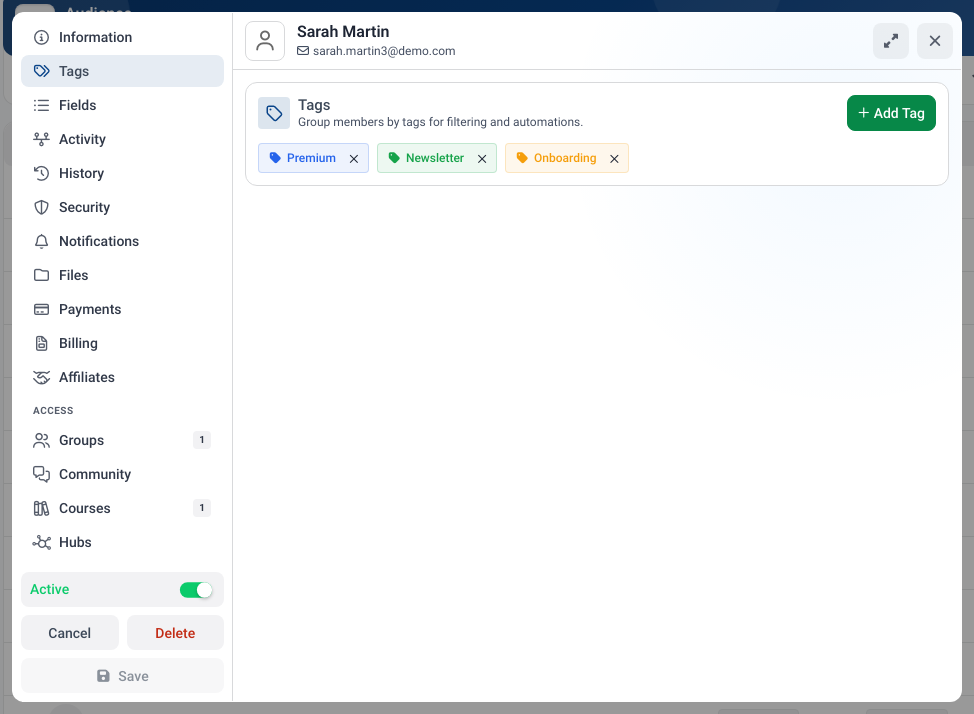
One profile per member: tags, course access, community activity and payments in the same record.
Where it falls short
It is a younger platform than Kajabi, so the ecosystem of agencies, templates and third party courses about the tool is smaller. If you value a large marketplace of done-for-you templates or want to hire from a deep pool of certified specialists, an established US platform still has the edge.
Best for
Creators and coaches who want Kajabi's breadth with a predictable bill and EU hosting. For a direct head to head, see the full MemberArea vs. Kajabi comparison, and check current plans on the pricing page.
Alternative 2: Teachable, simple courses
What it does well
Teachable is a well known course platform that is easy to start with, with a long track record and a clean student experience. If your main goal is to publish and sell structured courses without much fuss, it does that job well.
Where it falls short
Two limits matter. The Starter plan at $39 takes 7.5 percent of every sale, which passes the cost of a mid plan somewhere around $8,000 in yearly revenue, so the cheap tier is cheap only at small scale. Community features are also limited compared with dedicated tools, and there is no deep integrated CRM, so growing businesses usually add separate email and member management software.
Best for
Course-first creators who will move to Builder quickly and are happy to run email marketing in a separate tool. If Teachable is your leading candidate, our Teachable and Kajabi head to head puts the two side by side on price, fees and course features.
Alternative 3: Thinkific, scalable but add-ons add up
What it does well
Thinkific is an established course platform that many creators rate highly for reliability and a solid course building experience. It scales well and is a sensible home for a catalog that keeps growing.
Where it falls short
Some capabilities arrive through add-ons or higher tiers rather than being included everywhere, so the total cost can grow once you assemble the pieces that turn a course tool into a full business platform. We are not quoting Thinkific prices here because the pricing page is geolocated and shows different figures depending on the country you open it from. Take the numbers from Thinkific's own pricing page before you compare.
Best for
Course businesses that want a dependable delivery platform and already have their marketing stack elsewhere.
Alternative 4: Podia, simple and lightweight
What it does well
Podia is a friendly option for selling digital products, courses and simple memberships. Its strength is simplicity: you can get something on sale quickly without a steep learning curve.
Where it falls short
The Mover plan at $49 takes 5 percent of sales, and the email contact caps (100 on Mover, 500 on Shaker) bite earlier than most people expect, since your list usually grows faster than your customer count. Automations, APIs and advanced course features are lighter than on heavier platforms.
Best for
Lean setups with a small list and a handful of products, where simplicity is worth more than depth.
Alternative 5: Circle, community first
What it does well
Circle is a strong choice when community is the center of your offer. Discussions, spaces and events are polished, and the branded feel is among the best in this comparison.
Where it falls short
Courses are more limited than on dedicated course platforms, the Professional plan takes 2 percent of sales, and some capabilities sit on higher tiers. At $89 entry it is also one of the more expensive starting points here, and admin seats are capped per plan.
Best for
Membership models built around interaction rather than a fixed curriculum, where the course is a bonus and the conversation is the product. We compare the community platforms against each other in our guide to the best Circle alternatives.
Alternative 6: Skool, cheap to start
What it does well
Skool is deliberately minimal: one community, a simple classroom, a leaderboard and a calendar. That focus is the point, and it makes the tool easy to explain to members who have never used a community platform.
Where it falls short
The $9 Hobby plan takes 10 percent of every sale, which is the highest cut in this comparison and turns the cheapest entry into the most expensive option somewhere around $1,300 in monthly revenue. Course structure is basic, there is no built-in email marketing, and each plan covers a single community.
Best for
A first paid community where you want to validate the idea before investing in a platform. Once that community earns real money, the 10 percent starts to hurt, and the Skool alternatives worth a look become the more sensible home.
Alternative 7: Mighty Networks, community plus courses
What it does well
Mighty Networks sits between Circle and Kajabi: a community platform with real course support, native mobile apps and events. For a membership that mixes conversation and curriculum, that balance is genuinely useful.
Where it falls short
The Launch plan at $95 takes 2 percent of sales and limits you to three host seats, and email marketing is thinner than on an all-in-one platform. The branded app that many people come for sits on the enterprise tier, priced on request.
Best for
Community businesses that want courses and a mobile experience without moving to a full marketing suite.
Who should stay on Kajabi
Switching is not automatically the right answer, and a comparison that never says so is not worth much. Stay where you are if your funnels, pipelines and email sequences are deeply built out inside Kajabi and running well: rebuilding a working marketing engine costs more than the subscription you would save. Stay if you rely on the marketplace of agencies and specialists who know the platform. Stay if your revenue makes the monthly fee a rounding error and your team already knows the tool.
Look elsewhere if you pay for a marketing suite you barely open, if the five product cap on Basic is starting to shape your offers, if your members keep asking where their data is stored, or if the yearly total has grown faster than your revenue.
How to move off Kajabi without losing momentum
A migration goes wrong in predictable places. Plan for these four and it becomes a project rather than a crisis.
1. Export before you cancel
Pull your members, course content, videos and email list while your account is still active. Keep the export files even after the move: they are your fallback if something turns out to be missing three weeks later.
2. Treat active subscriptions as their own project
This is the step people underestimate. Existing recurring payments do not simply follow you, and how they move depends on which gateway held them. Ask both providers what is possible before you announce anything, and plan for the possibility that some members will need to re-subscribe. Getting this wrong turns a technical move into a revenue problem.
3. Rebuild in parallel, cut over once
Set up the new platform alongside the old one, move one course across, and run a real member through it end to end: signup, payment, access, email, login. Only then move the rest. Running both for a month costs one extra subscription and removes almost all of the risk.
4. Tell your members before they notice
A short, plain message a week ahead of the switch, explaining what changes and what does not, prevents most support tickets. Members forgive a new login screen. They do not forgive finding it by surprise.
How to compare the costs
Build a small spreadsheet with three columns: the monthly subscription at the tier your member count actually requires, the platform percentage on your expected yearly revenue, and the cost of any tool you would still need on the side, such as an email service or a community platform. Add them up per candidate. That single number is the only fair comparison, and it frequently reorders the shortlist you started with. Our overview of membership site software works through the same maths for the wider field, and if your revenue side is still open, how to price an online course is the better place to start.
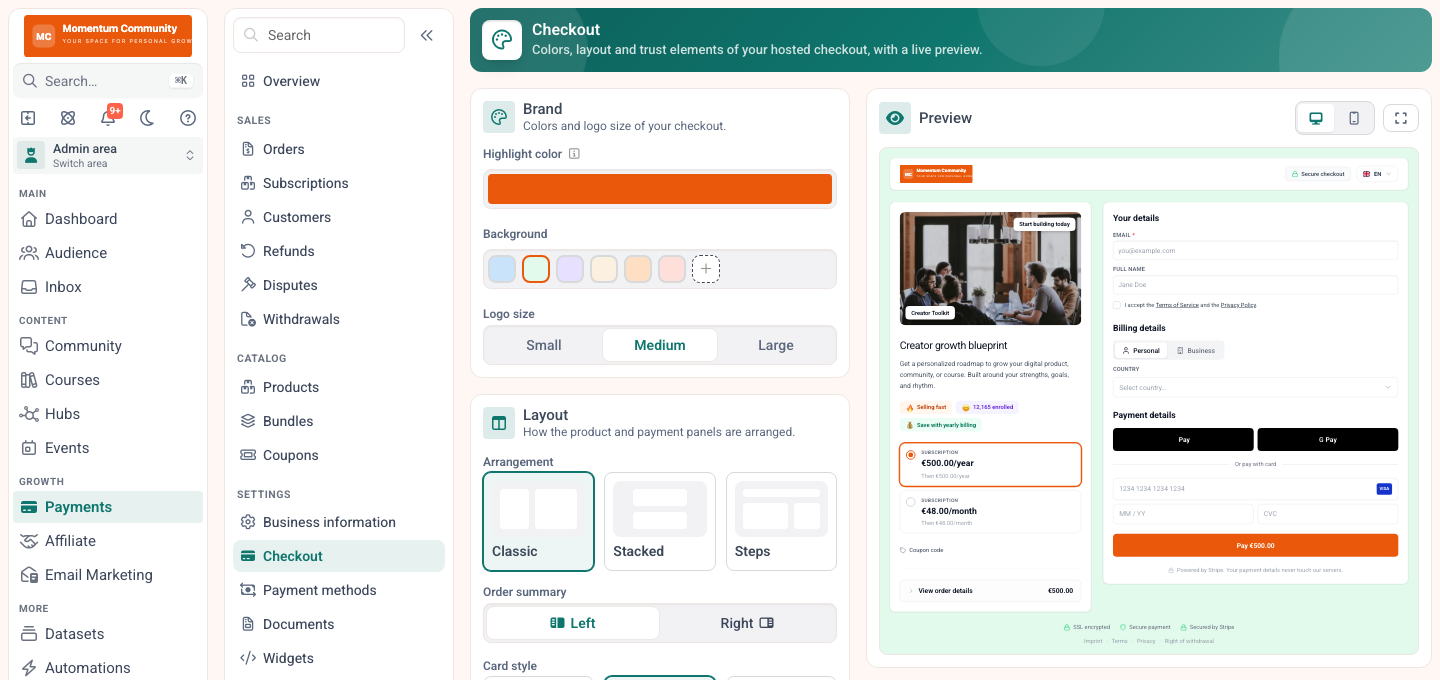
Payments run through your own Stripe account, so the platform fee column stays at zero.
The right alternative is the one that covers your whole stack in one bill, without taxing you per member or per sale.
Because prices change, take the figures from each provider directly rather than from any comparison post, including this one. The date at the top of each table here tells you how fresh the numbers are.
Verdict: which Kajabi alternative should you choose?
If you want one platform for courses, community, email and payments with no cut of your sales and EU hosting, MemberArea is the most direct Kajabi alternative and the easiest path for creators who have outgrown a course only tool. If you only need straightforward course delivery, Teachable or Thinkific are dependable, provided you move past Teachable's Starter tier quickly. If your business is lean and your list is small, Podia keeps things simple. If community is the product, Circle is built for it, and Mighty Networks adds courses and a mobile experience on top. If you are validating a first paid community and revenue is still small, Skool gets you started for almost nothing.
Shortlist two or three options, then test them with your real content during a free trial. Browse every head to head on the comparisons page, or start free on MemberArea and see for yourself.
Frequently asked questions
What is the best Kajabi alternative? It depends on your priorities. For an all-in-one platform with no platform fee and predictable pricing, MemberArea is a strong choice. For simple course delivery, Teachable or Thinkific work well, and for community Circle or Mighty Networks are a better fit.
Is there a cheaper alternative to Kajabi? Yes, several. Kajabi Basic is $2,148 a year paid monthly, while Teachable Starter is $468 and MemberArea Starter is €468. The catch is that some cheap tiers take a percentage of every sale, so compare subscription plus platform fee at your expected revenue rather than headline prices.
Which Kajabi alternative has no transaction fees? MemberArea takes no cut on any plan, since payments run through your own Stripe account. Teachable charges nothing from the Builder plan up, and Podia charges nothing above Mover. Your payment processor still charges roughly 2.9 percent in every case.
Can I migrate my courses and members from Kajabi? Yes. Export your members, content and email list while your account is still active, then rebuild on the new platform and cut over once. Active recurring subscriptions are the part to plan carefully, so ask both providers what is possible before you announce the move.
What happens to my active subscriptions if I switch? That depends on which payment gateway holds them. In some setups they can be migrated, in others members re-subscribe on the new platform. Clarify this first: it determines whether your switch is a technical task or a revenue risk.
Is there a Kajabi alternative hosted in the EU? Yes. MemberArea hosts in the EU and offers a data processing agreement, which matters if most of your members are European. With US based platforms, read the data processing terms and check with a qualified advisor if you are unsure.
How long does a migration take? For a single course and a few hundred members, a focused week is realistic, including a full test run. For a large catalog with many active subscriptions, plan a month and run both platforms in parallel while you move.
Final thoughts
There is no single best platform, only the best one for your situation. Get clear on the pain that made you look for a Kajabi alternative, add up subscription plus platform fee at next year's revenue, and confirm prices and data handling directly with each provider. Then test your shortlist with real content before you commit. Start free on MemberArea and find out whether it is the right fit for you.



Ready to build your membership?
Try it free for 14 days. No credit card, no setup fees. Launch in minutes.
No credit card required · Cancel anytime