
Blog
How to Set Up Stripe for Your Membership Site
Set up Stripe for your membership site step by step: create and verify your account, understand fees, add products and accept subscriptions and trials.
MonetizationA membership site lives and dies by its payments. If subscriptions fail to renew, trials do not convert or the checkout feels clunky, your recurring revenue leaks away no matter how good your content is. Stripe is the payment engine most membership sites rely on, because it handles recurring billing, retries failed charges and integrates cleanly with modern platforms. Setting up Stripe for your membership site the right way is one of the most important foundations you will lay.
This step-by-step guide covers creating and verifying your Stripe account, understanding the fees, setting up products and prices, connecting Stripe to your platform, and accepting subscriptions, one-time payments and trials.
The short answer: verify your Stripe account before launch, connect it to the platform that grants access, price your membership with the processing fee already built in, and make sure failed renewals are retried automatically. That last point is where most membership revenue actually leaks.
Stripe and your membership site: getting started
Before the steps, it helps to know why Stripe suits a membership site so well. Memberships depend on recurring payments, and recurring billing is exactly where Stripe is strongest. It charges members automatically each cycle, retries when a card fails, and handles the security and compliance of card data so that sensitive details never touch your own site.
For a membership site, that reliability is everything. A failed renewal that is never retried is lost revenue and often a lost member. Stripe's automatic handling of these cases quietly protects your income. It also supports the payment methods your members expect, from cards to local options, which keeps people from abandoning checkout.
It also helps to start with the member experience in mind. The smoother and more familiar the payment feels, the more visitors complete it. A branded, trustworthy checkout connected to a solid provider like Stripe removes the last hesitation before someone commits to a recurring payment.
The goal of this guide is a setup where a visitor can subscribe in a few clicks, get instant access, and keep their membership renewing without friction. Get the foundation right once, and payments become something you rarely have to think about again.
Creating and verifying your Stripe account
Getting started with Stripe is straightforward. You create an account, enter details about your business or self-employment, and complete a verification step. This check is legally required to prevent fraud and money laundering, so see it as a sign of legitimacy rather than a hurdle.
For verification, have a few standard things ready: information about you or your business, a bank account for payouts, and depending on your country some form of identity or business proof. With these prepared, the process is often quick. Only after successful verification can Stripe pay money out to you, so it is worth doing early.
Payouts start after verification, not after the first sale
Once verified, payouts happen automatically on a regular schedule to your linked bank account. You do not trigger them manually. Keep an eye on the timing of your first payout, since many countries have a short initial waiting period before the regular rhythm begins. After that, the money simply arrives.
Understanding Stripe fees
Fees cause a lot of confusion, but the distinction is simple. There are two separate things: the fee charged by the payment provider, and any commission taken by the platform you sell through. The provider fee always applies, because the payment has to be processed. The platform commission, however, is avoidable.
Stripe itself charges a transparent fee per transaction. This is normal and exists with every payment provider, since processing a payment costs something. What matters is knowing the rate in advance and building it into your pricing so the amount you want still lands with you after fees.
What a platform commission costs over a year
Take a membership site at €5,000 in monthly recurring revenue. The processing fee applies either way and adds roughly 2.9 percent, which you can check on the Stripe pricing page for your country and card mix. What differs is the platform's own cut:
| Platform commission | Per month on €5,000 | Per year | Over three years |
|---|---|---|---|
| 0 percent | €0 | €0 | €0 |
| 2 percent | €100 | €1,200 | €3,600 |
| 5 percent | €250 | €3,000 | €9,000 |
| 10 percent | €500 | €6,000 | €18,000 |
Straight multiplication on a flat €5,000, before the processing fee that applies in every row. Real revenue grows, which makes the gap wider rather than narrower. Rates differ per provider, so check the current terms yourself.
The bigger thing to watch is an extra platform commission. Some membership platforms add their own percentage of every payment on top of the Stripe fee. Over many recurring payments, that adds up significantly. A setup that processes payments through your own Stripe account without an added commission leaves you far more of your revenue. More on how payments are handled is shown on the payments page.
Run the numbers with your expected monthly recurring revenue, not just a single sale. Because memberships bill again and again, a percentage skimmed off every renewal compounds over time into a large amount that quietly leaves your business.
Setting up products and prices in Stripe
With your account ready, you define what you sell. In Stripe terms, you create products, such as your membership, and assign prices to them. For a membership site, the most important prices are recurring ones: a monthly fee, an annual fee, or both. You can also create one-time prices for extras and add-ons.
The good news is that when you use an integrated platform, much of this is handled for you rather than configured by hand in Stripe. You set your membership price on the platform, and the recurring billing is created behind the scenes. That keeps everything in sync and avoids the common mistakes of managing prices in two places.
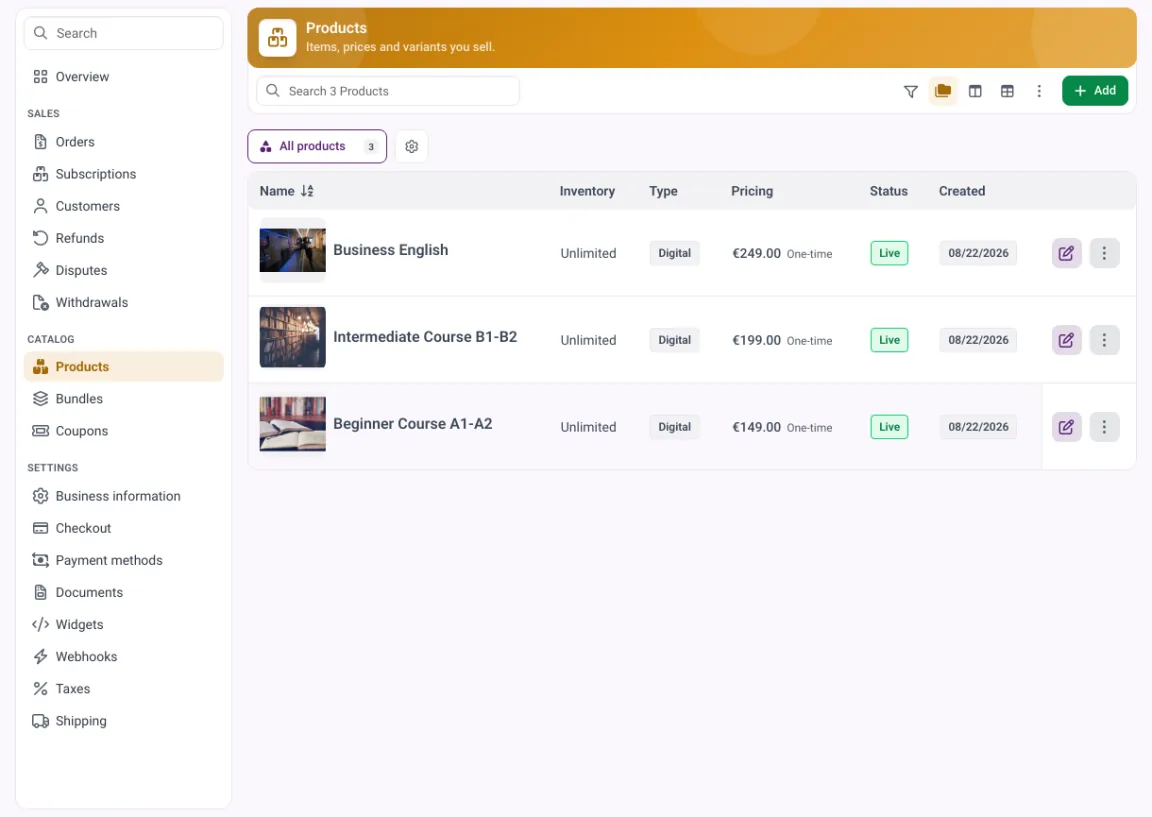
Set the price where the membership lives and the recurring price is created in Stripe behind the scenes. Where to set that number is covered in how to price an online course.
Think through your pricing structure before you start: which plans you offer, whether you bill monthly or annually, and whether you want trials. A clear structure now saves confusion later and makes the member experience clean. You can set up tiers and prices on the pricing page.
Connecting Stripe to your platform
The most important step is connecting Stripe to the platform that runs your membership site, because that is what links a payment to actual access. When a member subscribes, the platform should grant access instantly, and when a subscription ends, it should remove access automatically. That automation is the heart of a membership site.
Doing this with a patchwork of separate tools is where many creators run into trouble: data falls out of sync, access is granted late, or cancellations are missed. A platform with a native Stripe connection avoids all of this. You connect your account once, and every payment, renewal and cancellation flows through to the right access without manual work.
One thing European members will notice
If your members are in Europe, their card payments fall under strong customer authentication, a PSD2 rule in force since 14 September 2019 that changes how customers authenticate online payments (Stripe on SCA). In practice the first payment often asks for a bank app confirmation, while later renewals of the same subscription usually run without it. That is normal and not a broken checkout, but it is worth knowing before someone reports it as a bug.
Look for a connection that uses your own Stripe account, so you remain the merchant of record and keep control of your payments and customer relationship. The setup should take minutes, not days. See how the checkout looks on the checkout page.
Accepting subscriptions, one-time and trial payments
A good membership setup handles more than a single payment type. Subscriptions are the core: recurring charges that renew automatically and keep access active. Stripe handles the renewals and retries, so you focus on delivering value rather than chasing payments.
The renewals that quietly fail
Cards expire, balances run out, banks decline. On a membership site those failed renewals are the biggest silent source of lost revenue, because nobody cancelled, the payment simply did not go through. Stripe can retry automatically and recommends its Smart Retries schedule, though you can also define your own (Stripe on automated retries). Pair the retries with an email to the member and a short grace period before access ends:
| When | What the system does | What the member sees |
|---|---|---|
| Day 0 | charge fails, first retry scheduled | nothing yet |
| Day 1 to 3 | further retries | an email asking them to update the card |
| Grace period | access stays on | a reminder, access still works |
| End of grace | subscription cancelled, access removed | a final email with a link to resubscribe |
The grace period is the part people skip. Cutting access on the first failed charge turns an expired card into a lost member. The wider retention picture is in reduce community churn.
One-time payments matter too, for things like a setup fee, a premium add-on or a separate course sold alongside the membership. And trials are a powerful tool for memberships: a free or low-cost trial period lets people experience your community before committing, which can lift sign-ups significantly when the value is clear.
The key is that all of these work together cleanly, with access granted and removed automatically in each case. When subscriptions, one-time payments and trials all run through one connected system, your members get a smooth experience and you get reliable, predictable revenue. See how recurring billing works on the subscriptions page. What recurring revenue does to a course business over time is laid out in recurring revenue for course creators.
Connect Stripe to memberarea.io in under 5 minutes
Setting up Stripe for your membership site is simplest when the connection is clean and direct. On memberarea.io you connect your own Stripe account to the platform, then accept subscriptions, one-time payments and trials over it, with access granted and removed automatically. Payments run through your account, you stay the merchant of record, and no extra platform commission is added on top of the Stripe fee. How that compares across the market is covered in membership site software.
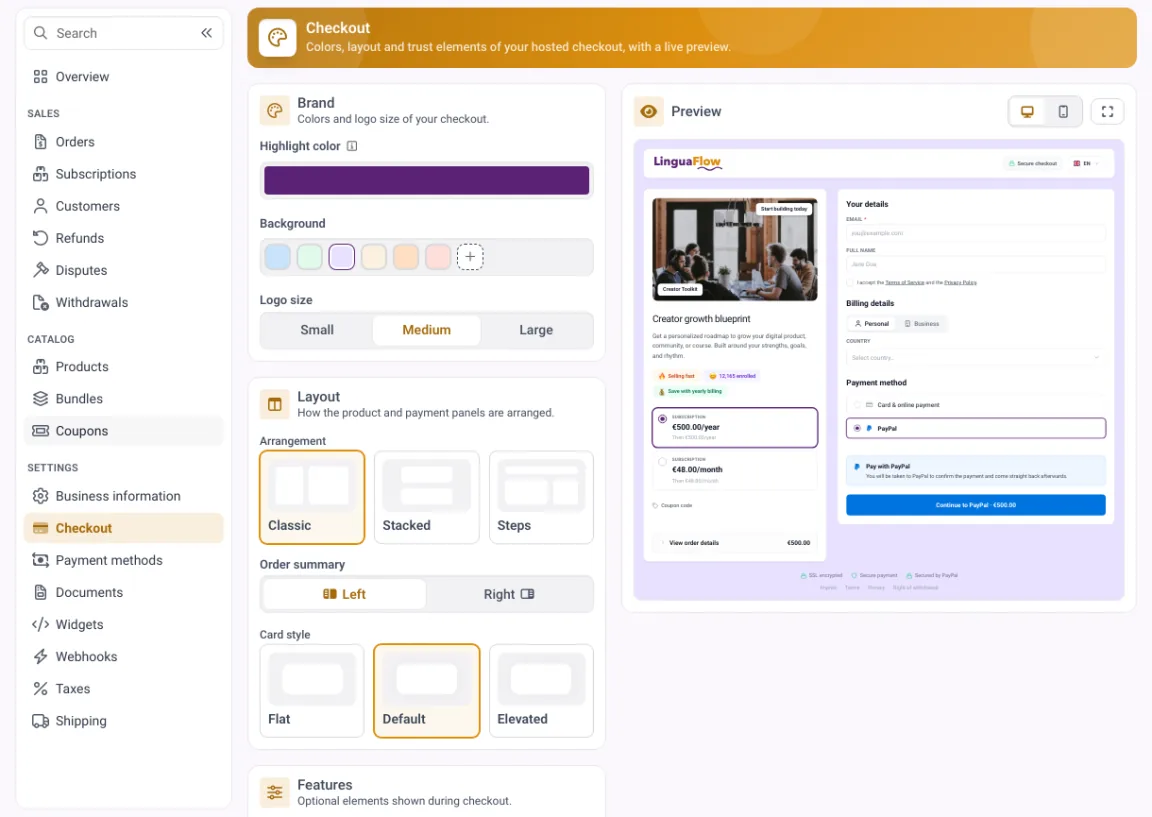
The checkout is the last thing a member sees before they trust you with a card. Order bumps sit here too, a mechanic covered in upselling an online course.
Because membership, community, billing and access live together, a visitor becomes a paying member with instant access, and a cancellation ends access without you lifting a finger. Learn more about your membership community on the community page and see the plans on the pricing page.
Connect Stripe to memberarea.io in under 5 minutes and start accepting payments for your membership site today. Try memberarea.io for free and set up your payments where your membership already lives.
Frequently asked questions
Do I need a business to use Stripe? You need valid details about your activity and to complete verification. Whether a registered business is required depends on your situation and country, so check locally or with an advisor.
Are there really no fees with Stripe? Stripe charges a fee per transaction, as every provider does. What you can avoid is an extra platform commission on top of that. A direct connection to your own account keeps that platform cut at zero.
Can I offer free trials? Yes. Trials are well suited to membership sites and let people experience the value before paying. When the trial ends, the subscription begins automatically unless the member cancels.
Conclusion
Setting up Stripe for your membership site is straightforward and gives you a reliable foundation for recurring revenue. Create and verify your account, understand the fees and avoid an unnecessary platform commission, set up clear products and prices, connect Stripe so access is automatic, and support subscriptions, one-time payments and trials.
Connect your own Stripe account directly and keep more of what you earn. Try memberarea.io for free and set up Stripe where your membership, content and community already live.



Ready to build your membership?
Try it free for 14 days. No credit card, no setup fees. Launch in minutes.
No credit card required · Cancel anytime