
Blog
How to Build a Self-Paced Online Course Without Video
Build a self-paced online course without video: why text works, which formats to mix, how to structure it, and how to keep students engaged.
Creating coursesVideo gets all the attention in online education, but it is not the only way, and often not the best way, to teach. A self-paced online course built on text, audio, downloads and interactive quizzes can be faster to produce, easier to update, and more convenient for students who would rather read than watch. If the thought of recording yourself on camera has stalled your course for months, this is your permission to skip it.
This guide shows how to build an engaging self-paced online course without a single video: why text-based learning works, which formats to combine, how to structure the curriculum, and how to keep students moving all the way to the end.
The short answer: write short lessons around one idea each, add an audio version and a download where they help, close every lesson with a small action, and show the student where they are. A text course can be published in weeks instead of months, and it is the format most professional audiences actually prefer.
Why a self-paced online course works without video
Plenty of learners actively prefer text. Reading is faster than watching for most people, it is easy to skim and search, and it works in situations where video does not, on a commute, in an open-plan office, or on a slow connection. A self-paced online course in text form meets students where they are.
Text also has practical advantages for you as the creator. It is far quicker to produce than polished video, trivial to update when something changes, and naturally accessible and translatable. There is no studio, no editing, and no re-recording an entire lesson because one sentence was wrong. For many topics, especially frameworks, processes and reference material, a well-written lesson teaches better than a talking head ever could.
None of this means video is bad. It means video is optional. The goal is a clear transformation for the student, and a self-paced online course can deliver that with the right mix of non-video formats.
What a lesson costs to make
| Format | Time for one lesson | Updating it later | Best for |
|---|---|---|---|
| Text | an afternoon | edit a sentence | frameworks, processes, reference material |
| Audio version of the text | plus 30 minutes | re-record that one file | commuters and listeners |
| Worksheet or template | an hour | swap the file | turning reading into doing |
| Quiz | 20 minutes | edit a question | proving something landed |
| Video | a day or more with editing | re-record the whole lesson | demonstrations and software walkthroughs |
Rough production estimates, not measurements. The ratio is what matters: the cost of fixing a mistake is what really separates text from video.
Length, in minutes rather than words
Plan lessons in reading time, not word count. Jakob Nielsen's rule of thumb is to assume a reading speed of 200 words per minute, and his 2008 study also found that on an average web page people have time to read at most 28 percent of the words, with 20 percent the more likely figure (Nielsen Norman Group). At 200 words a minute a 600 word lesson is roughly three minutes and a 1,200 word lesson about six. Aim for three to six minutes per lesson and a module of five lessons lands at under half an hour, which is a realistic evening for a working student. State the reading time at the top of each lesson and people will start them instead of saving them for later. And write as if only a fifth of it will be read: the important sentence goes first, not after the build-up.
There is a speed advantage worth emphasizing. A text lesson can go from outline to published in an afternoon, while an equivalent video might take days once you account for scripting, recording, re-takes and editing. That speed lets you ship a first version, gather feedback from real students, and improve, instead of polishing a video course nobody has bought yet. Shipping beats perfecting, and text ships fastest.
Formats to use: text, audio, PDF and quizzes
A non-video course does not mean a wall of plain text. The best self-paced online course blends several formats so the experience stays varied and engaging:
- Structured text lessons: The backbone. Short paragraphs, clear headings, bullet points and the occasional image or diagram make text easy to follow.
- Audio: Record lessons as audio for students who prefer to listen on the go. Audio is far easier to produce than video and still adds a personal, human voice.
- PDFs and downloads: Worksheets, templates, checklists and cheat sheets turn passive reading into active doing and give students something to keep.
- Quizzes and exercises: Short knowledge checks and practical assignments make the course interactive, reinforce learning, and create a sense of progress.
The art is in the mix. A lesson might open with a few hundred words of explanation, offer an audio version for listeners, include a downloadable template, and end with a two-question quiz. That variety keeps a self-paced online course feeling alive without any video at all.
Text starts accessible, video has to be made accessible
This is the argument nobody makes for text courses, and it is the strongest one. The Web Content Accessibility Guidelines require captions for all prerecorded audio content in synchronised media at Level A, the lowest conformance level (WCAG 2.2, Success Criterion 1.2.2). Every video lesson you publish therefore carries a captioning job with it. A written lesson is already readable by a screen reader, already searchable, and already translatable.
Accessibility is a quiet bonus. Text is readable by screen readers, easy to translate into other languages, and simple for students to copy a snippet from or search later. Pair a written lesson with an audio version and you cover both readers and listeners with a fraction of the effort a video would demand. Few formats serve as many people for as little production cost.
Structuring a self-paced curriculum
Structure matters even more without video, because text gives fewer cues about pacing and importance. A clear hierarchy keeps students oriented:
- Start from the outcome. Define the single result your student will achieve, then work backwards into the modules and lessons that get them there.
- Group into modules. Bundle related lessons into modules, each with its own mini-goal, so progress feels like a series of completed stages.
- Keep lessons short. One idea per lesson, readable in a few minutes. Short lessons matter as much in text as in video for keeping momentum.
- Add a quick win early. Put an easy, satisfying result in the first module so students feel capable and motivated to continue.
| Part of the lesson | What it does | Rough length |
|---|---|---|
| One line summary | tells the student what they will be able to do | 1 sentence |
| Explanation | the idea itself, one idea only | 300 to 600 words |
| Example | makes the idea concrete | 100 to 200 words |
| Action | the small thing they do now | 1 to 3 sentences |
| Check | a two question quiz or a reflection prompt | 2 questions |
The same skeleton for every lesson. Predictability is a feature in a self-paced course, because the student never has to work out how a lesson is built.
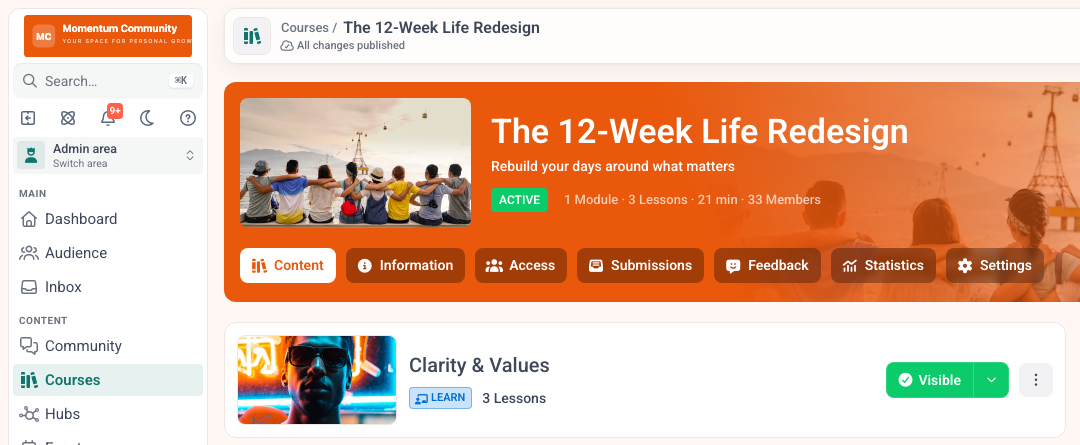
Modules give the course its stages. The build itself is covered in how to create an online course.
End each lesson with a clear next step, a small action or a single question, so the path from one lesson to the next is obvious. In a self-paced course there is no instructor nudging students along, so the structure has to do that job.
Signposting carries extra weight in a text course. Use consistent headings, a short summary at the top of each lesson, and a clear label for where the student is in the overall journey. A simple line like "Lesson 3 of 7" reassures students that the end is in sight, which is exactly the cue a video player's progress bar would otherwise provide.
Keeping students engaged without video
The biggest worry creators have about text courses is engagement, but the levers are the same ones that work for any course, video or not. Build in interaction, accountability and a sense of progress.
Interactive elements carry the most weight here. Quizzes, reflection prompts and practical assignments turn reading into participation, and participation is what makes learning stick. A visible progress bar gives the same satisfaction as ticking off a list. A community where students discuss the material and share results adds the accountability that keeps people coming back, and it matters even more when there is no on-screen personality to bond with.
Drip-releasing the content helps too: a steady weekly rhythm prevents overwhelm and gives students a reason to return. Combine short lessons, interaction, a progress indicator and a community, and a text-based course can hold attention just as well as video, often better, because students move at their own speed. The mechanics of scheduled release are in drip course content, and what actually moves finishing rates is in online course completion rates.
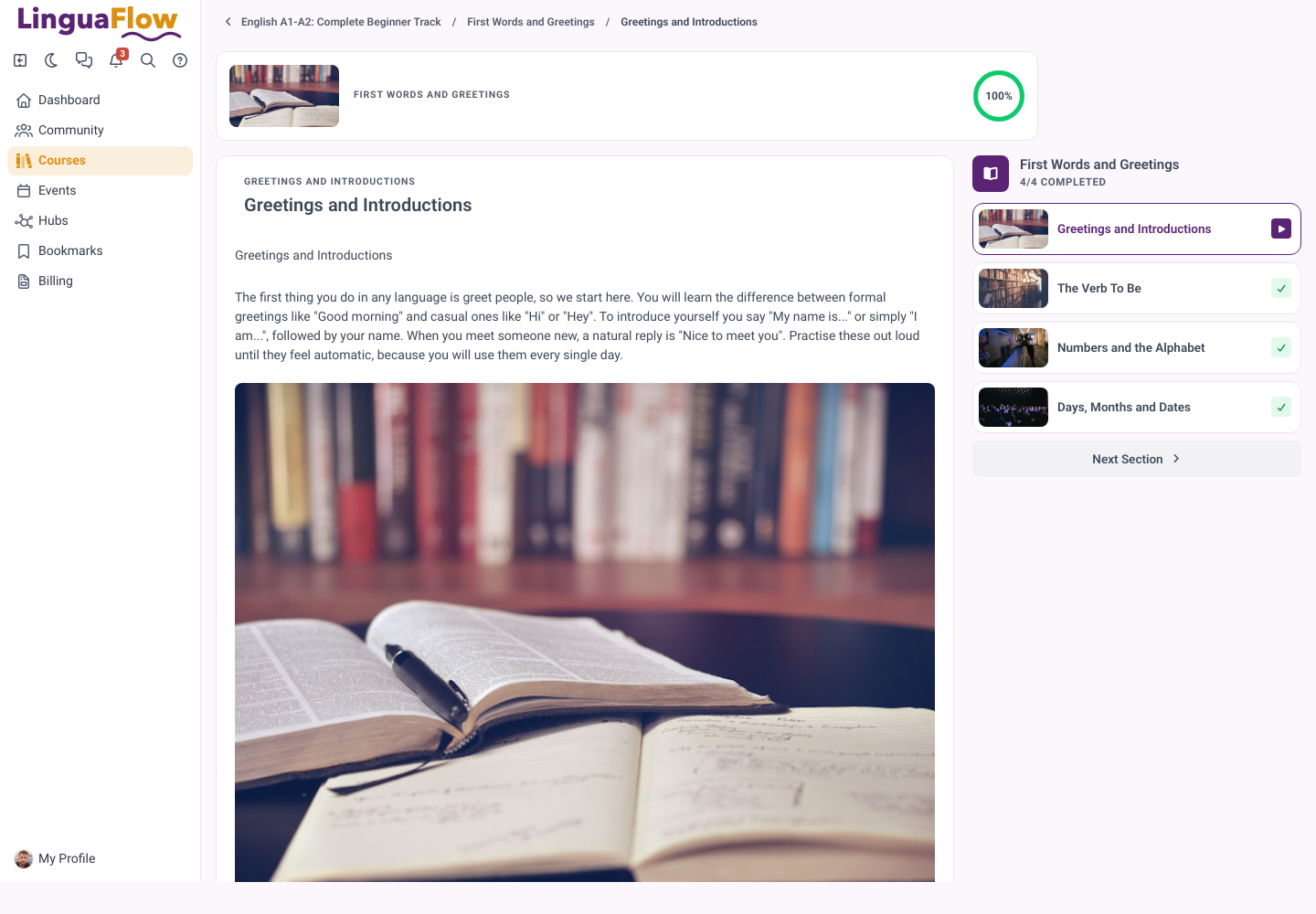
No video on this page, and it still reads as a course: progress ring, one lesson at a time, the rest of the section one click away.
Your writing style does a lot of the work. Write the way you would explain something to one person across a table: short sentences, plain words, the occasional direct question. A warm, clear voice on the page builds the same connection a friendly presenter builds on camera. Break up long stretches with subheadings, lists and examples so no screen ever feels like a daunting block of text.
Who text-based courses work best for
Text-based courses shine for certain topics and audiences. Frameworks, step-by-step processes, written skills like copywriting, technical reference material, and anything students will want to look up again all suit text beautifully. Professional and busy audiences often prefer to read because they can move at their own pace and revisit specifics in seconds.
Video still earns its place where seeing matters: physical demonstrations, software walkthroughs, or building rapport for a high-touch coaching offer. The smart move is not to pick a side but to lead with text for speed and clarity, then add a short video only where it genuinely teaches better. That keeps production light while giving each lesson the format it deserves. Where AI can shorten the writing itself, and where it should not be trusted, is covered in AI tools for course creators.
Tools for building non-video courses on memberarea.io
You do not need a separate tool for a non-video course. On memberarea.io you build a self-paced online course in a drag-and-drop editor that mixes text, images, audio, downloads and quizzes in the same lesson, with no video required. You can structure modules and lessons, drip-release content, add a progress bar, and wrap it all in a community, under your own branding.
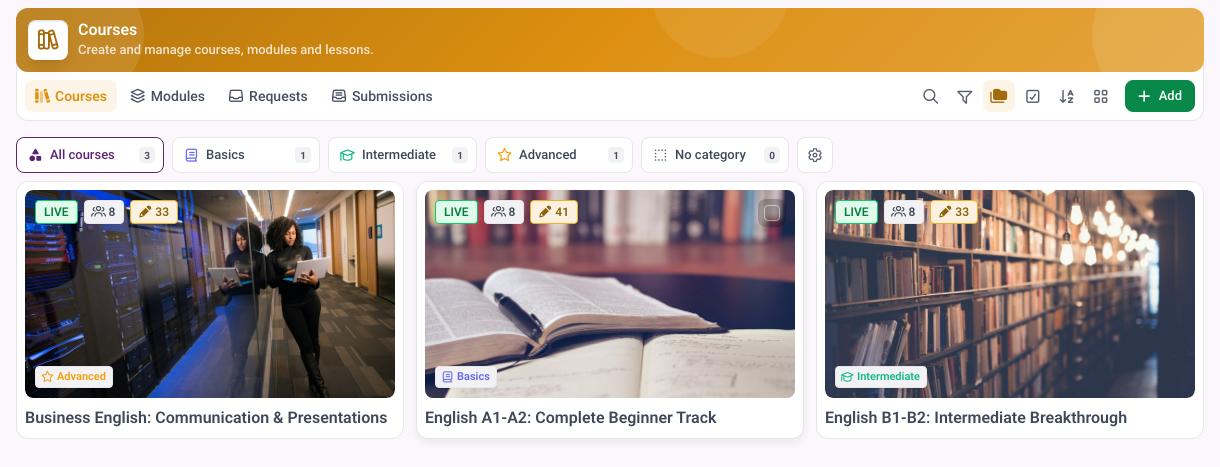
A text course is a course like any other. Nothing in the platform expects video. What to charge for it is a separate question, answered in how to price an online course.
Because everything lives in one platform, the pieces work together: a completed quiz can unlock the next lesson, a milestone can trigger a congratulations, and members can discuss each lesson in the community. See the full builder on the courses page, the interactive elements on the interactive content page, and plans on the pricing page.
Build your text-based course on memberarea.io and stop letting the lack of a camera hold your knowledge hostage. Start free and turn what you know into a self-paced course your students can take anywhere.
Frequently asked questions
Will students pay for a course without video? Yes, if it delivers a clear result. Buyers pay for the transformation, not the format. A focused text course that solves a real problem can command the same price as a video course, sometimes more if it respects the reader's time.
Is text or video better for completion? Neither wins automatically. What drives completion is short lessons, interaction, progress and community, and those work in any format. Many students actually finish text courses faster because reading is quicker than watching.
Can I add video later? Absolutely. Start with text to launch quickly, then add audio or video to specific lessons over time if it adds value. A non-video course is a great starting point, not a permanent limitation.
Conclusion
You do not need a camera, a studio, or editing skills to teach online. A well-structured self-paced online course built on text, audio, downloads and quizzes can be faster to create, easier to maintain, and just as effective as video, especially when you add interaction, progress and community. The format that gets your knowledge published beats the polished one that never ships.
If you have been waiting to feel ready to record, stop waiting. Start free on memberarea.io and build a self-paced course from what you already know how to write.



Ready to build your membership?
Try it free for 14 days. No credit card, no setup fees. Launch in minutes.
No credit card required · Cancel anytime