
Blog
How to Create an Online Course That Sells in 2026
A practical, step-by-step guide to building a profitable online course: validating your idea, structuring the curriculum, recording lessons, and launching to your first paying students.
Creating coursesMost people who set out to create an online course start by recording. Four months later they have thirty videos, no buyers and a quiet suspicion that they built the wrong thing. The recording was never the hard part. The hard part is knowing what someone will pay for before you spend a season making it.
This guide walks through the six phases in the order that actually saves time, from the first demand test to the first paid seat. It is written for coaches, consultants and practitioners who want to package what they know once and sell it repeatedly. No video experience required. What you do need is a topic people already ask you about.
The process at a glance
| Phase | What you end up with | Realistic time |
|---|---|---|
| 1. Test demand | A proven topic and first buyers | 1 to 2 weeks |
| 2. Plan the structure | Module and lesson outline | 2 to 4 days |
| 3. Record | Finished lessons | 1 to 3 weeks |
| 4. Set up the platform | Course area, access, design | 1 to 3 days |
| 5. Pricing and payments | Checkout, plan, invoices | 1 day |
| 6. Launch | First paying students | 2 to 4 weeks |
These estimates assume a course of roughly 20 lessons built alongside existing work. Full-time is faster, evenings-only takes longer.
Step 1: Test demand before you produce anything
The most expensive mistake when you create an online course is a finished course nobody buys. It costs you the production time and the months you could have spent building something else. That is why demand comes first and the script comes second.
Three signals that matter
First: are people already asking you about this? When the same question keeps surfacing in calls, comments and emails, you have a topic. When you have to invent the question yourself, you have a hunch.
Second: does competition exist? Many treat rival courses as a bad sign. The opposite is true. A topic with no providers at all is usually a topic with no willingness to pay. Existing courses, books and coaching prove that people spend money on the problem.
Third: is the pain specific? "Take better photos" is a wish. "My product shots look amateurish and I am losing customers to competitors with better images" is a pain. People pay for pain, rarely for wishes.
Pre-selling is the only honest test
Talk is cheap, including your audience's talk. The only reliable test is money. Describe the course on one page, state the outcome, the scope and the start date, set a price and open enrolment before a single lesson exists.
It feels uncomfortable and it is still the fastest route to the truth. People who buy early give you two things: proof the topic carries, and a deadline that makes you actually produce. If too few sign up, you lost two weeks instead of four months.
An early-bird price is fair here, not shady. First students take a risk and follow a course that is still being built. They are entitled to pay less.
Which format fits your topic
Decide the shape before you structure anything. It changes effort, price and support fundamentally, and switching later usually means rebuilding.
A self-paced course is available any time and runs without you. It scales best and has the lowest completion rates, because nobody is waiting and nobody follows up. For tightly defined topics with one clear path, it is the right call.
A cohort course starts on fixed dates with a group moving through together. Completion rates are far higher, because deadlines and peers create accountability. You can charge more, but you are committed for the duration.
A hybrid combines both: self-paced material plus regular live sessions for questions. It is the most common shape in practice, because it creates accountability without you teaching every lesson live.
An honest recommendation for a first course: run it as a cohort even if you eventually want it self-paced. The first group shows you in real time where your explanations fail. Fold those fixes in, and what remains is the self-paced course that later runs without you.
Step 2: Build a structure that leads somewhere
A course is not a video library, it is a route from A to B. That distinction decides whether students finish or stop after lesson three.
Work backwards from the outcome
Write the end result as a single sentence first: "By the end of this course you will have sent your first newsletter to 100 subscribers." Then list everything standing between where your students are today and that sentence. Each milestone becomes a module, each individual step a lesson.
The advantage of this direction is that redundancy becomes obvious. Anything that does not serve the end result gets cut, however interesting it is. Interesting is the enemy of finished.
Short lessons, clear modules
Keep lessons under ten minutes. Not because attention spans are short, but because a lesson has to fit into a gap. Students do not learn in one block, they learn between other obligations. What fits into one sitting gets started.
Four to eight lessons per module is a good range. When a module grows past that, it is usually covering two topics and should be split.
Put the first win up front
Design the first module so students achieve something visible on day one. No foundations block, no terminology, something they can show. A student who wins in the first hour comes back tomorrow. A student who gets theory often does not.
If you want to work on this systematically, see our piece on course completion rates.
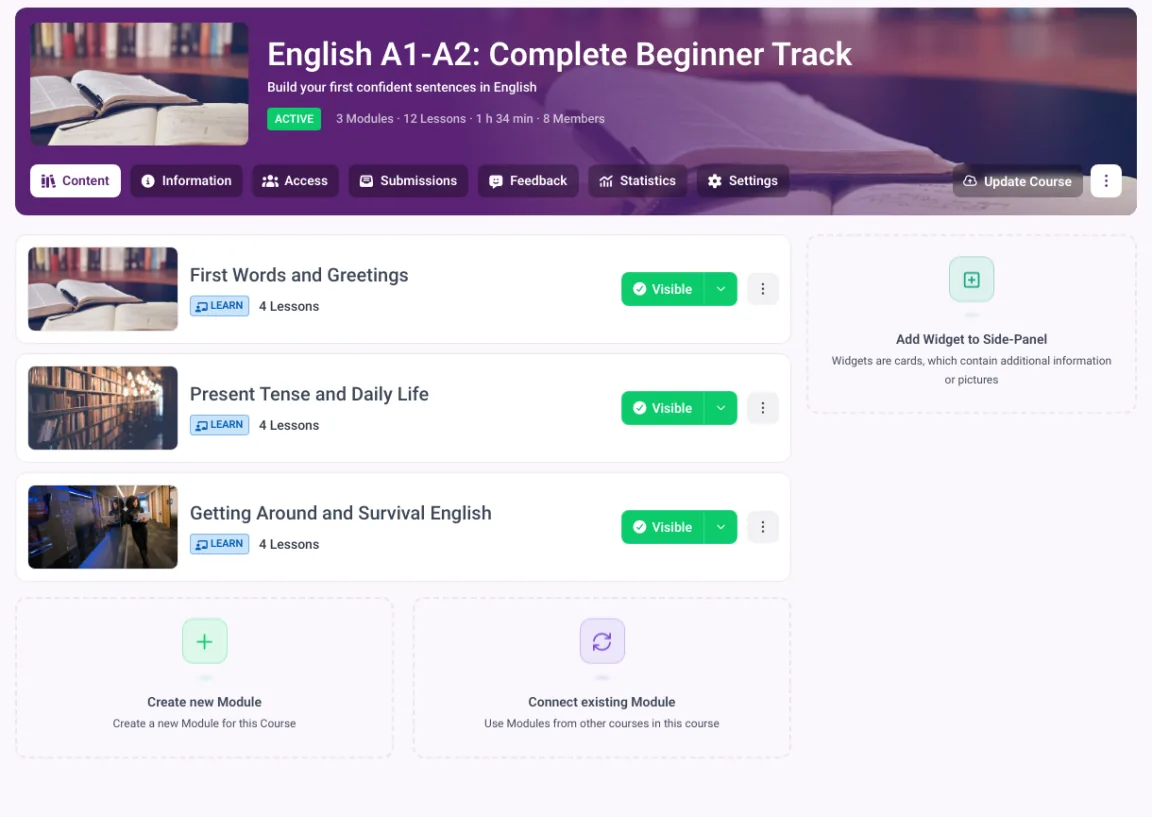
A course cut into modules: each module a milestone, each lesson a step.
Step 3: Record without a studio
This is where most of the fear sits and the least of the success. Students forgive mediocre picture. They do not forgive bad audio or an unclear explanation.
What you actually need
A decent microphone is the one purchase that pays for itself immediately. Everything else you can solve with what you own: a current phone films better than most webcams, and screen recordings need no camera at all.
The room matters more than the gear. A space with carpet, curtains and furniture sounds dramatically better than an empty office with hard walls. Two blankets outside the frame replace any acoustic treatment.
Screen or face
Show the screen when you demonstrate: software, spreadsheets, examples, templates. Show your face when you frame, motivate or convey a stance. Most good courses alternate rather than committing to one.
For beginners, screen recording with voiceover is the fastest path to a finished course. It is easier, quicker and painless to redo when a section goes wrong.
Batch instead of perfect
Record a whole module in one day, same clothes, same setup. It saves setup time and keeps the audio consistent. Cut the stumbles, leave the small imperfections. A course that sounds human sells better than one that sounds like an advert.
Step 4: Choose a platform
The platform determines how your course looks, how you get paid and what happens when ten students become three hundred. Four questions settle it.
Do you own the relationship?
On marketplaces like Udemy the customer belongs to the platform. You get reach but no email addresses and no control over price. That can work as an entry point, it rarely works as a business.
What is left of the sale price?
Watch two layers: the monthly fee and the cut per sale. Two percent sounds harmless, but on $100,000 of annual revenue it is $2,000 every year, on top of the subscription. Add both before deciding.
| Platform | Entry plan per month | Platform fee per sale | What that costs on $50,000 a year |
|---|---|---|---|
| memberarea.io | €39 | none | 0 |
| Teachable Starter | $39 | 7.5% | $3,750 |
| Podia Mover | $49 | 5% | $2,500 |
| Kajabi Basic | $179 | 2% with an external gateway | $1,000 |
Prices checked on 6 September 2026, excluding payment processor fees. The last column is the platform fee alone, on top of twelve monthly payments.
Read the last column before the first. At $50,000 a year the fee on the cheapest tier costs more than eight years of an entry plan without one. Our roundup of membership site software runs the same maths across seven platforms.
How many tools do you have to connect?
A typical stack is course platform, email tool, payment provider, community and website. Every connection between them is something that can break and another subscription. A platform that already includes courses, community, payments and email saves money, but mostly it saves the maintenance time.
With MemberArea, the course area, drip content, quizzes, certificates, community and checkout sit in one system, payments run through your own Stripe account with no extra platform cut, and hosting is in the EU.
Does it fit European data protection?
If your students are in Europe, you need a data processing agreement, a defensible statement about where data is stored, and terms that match your legal setup. International providers can often supply this, but rarely as the default.
Step 5: Set the price and take payments
Price is a positioning decision, not an arithmetic problem. It says more about the expected value than any sales page copy.
Price the outcome, not the runtime
Video minutes are the worst possible basis. They reward padding and punish the course that delivers the same result in half the time. Ask instead what the outcome is worth. A course that lands someone their first paying client is worth more than one that improves a hobby. The full method is in how to price an online course.
Three models, three situations
A one-off payment suits a finite course with a clear end. It is the easiest to sell and the easiest to understand.
Instalments lower the barrier on higher-priced offers. Expect a failure rate and plan for it rather than being annoyed later.
A subscription fits when you keep delivering: regular material, live sessions, an active community. Without that ongoing value members cancel after two months and you have built work without income. More in our piece on recurring revenue.
The parts nobody mentions
Beyond checkout you need invoices with correct tax treatment, a way to handle cross-border sales, and a route to revoke access when a payment fails. The processor fee is separate from any platform cut: Stripe publishes its current rates, and running a membership site on Stripe covers the practical side. It sounds like housekeeping and it is the part that consumes the most time later if it is missing.
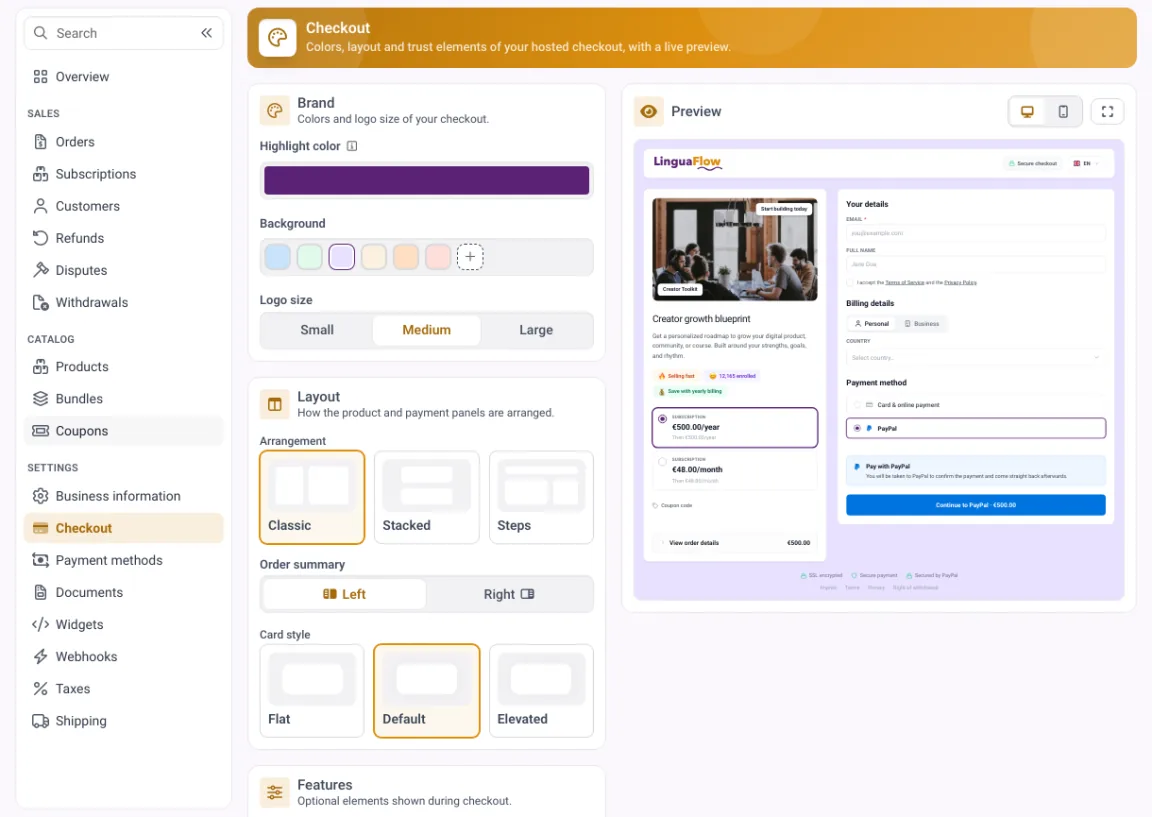
One-off, instalments and subscription run through the same branded checkout on your own Stripe account.
Step 6: Launch rather than publish quietly
A course that simply appears almost never sells. A course with a date, an expectation and a closing enrolment window does.
The weeks before
Build attention two to three weeks ahead. Give away something useful on its own: a checklist, a recording, a walkthrough of one step. Whoever benefits believes the paid course delivers what it promises.
Collect email addresses while you do it. The list is the only channel you own and the only one still there for your second launch. Reach on someone else's platform can disappear overnight.
The enrolment window
Open enrolment for a limited period, typically five to seven days. Write several times during it, not once. Most purchases happen on the final day, and sending a single reminder throws exactly that away.
After the launch
The first run is your most valuable data. Ask after two weeks where students got stuck, and look at which lesson they stop on. Fixing that one point is worth more than three new modules.
The most common mistakes
- Producing too early. Demand first, camera second. That order saves the most wasted months.
- Too much content. Completeness is not a selling point. Students want a result, not a reference work.
- No early win. When hour one is all theory, completion drops immediately.
- Pricing too low. A cheap price does not lower the barrier, it lowers expected quality and attracts the students who put in the least.
- Publishing quietly. Without a date and a deadline everyone defers the decision, and deferred means never.
- Too many tools. Each extra tool costs money, maintenance and one more thing that can break during checkout.
Frequently asked questions
How long does it take to create an online course? With a settled concept and disciplined execution, six to ten weeks alongside existing work is realistic. The biggest time sink is rarely recording, it is the unclear structure before it.
How many lessons does a course need? As many as it takes to deliver the promised outcome and no more. Twenty short lessons across four modules covers most topics comfortably.
What does it cost to build? The technical cost is small: a microphone from around $100 and the platform's monthly fee. The real investment is your time.
Do I need expensive video equipment? No. Clean audio and a clear explanation beat any camera. Buy the microphone first and worry about the rest later.
What should I charge for an online course? Price against the value of the outcome and the audience. Courses aimed at professional results sit considerably higher than courses for personal interests, because the investment pays back directly.
Should I sell before the course is finished? Yes, as long as you are transparent. State clearly when each module arrives and hold to it. Pre-selling is the only demand test that does not lie.
Final thoughts
Creating an online course is less a production task than a sequence of decisions: what will people pay for, what outcome are you promising, and how do they buy. Answer those three first and simple equipment will carry you to a course that sells. Start with the camera and you usually end up with a lot of footage and very little revenue.
The fastest route to a finished course is a published one, not a perfect one. Test demand this week, plan the structure next week, and record the first module before you worry about polish. Start free with MemberArea and keep course, community and checkout in one place.



Ready to build your membership?
Try it free for 14 days. No credit card, no setup fees. Launch in minutes.
No credit card required · Cancel anytime